
How Many Poster Boards Do I Need?
Planning an exhibition or poster session can be daunting, whether you are organising an academic conference, a trade show, or a public consultation. One of the most common questions is: how many poster boards do I actually need?
This guide explains how to calculate the right number of display boards for your event, taking into account room size, visitor flow, and board type. All examples are tailored to Edinburgh venues and the types of boards available from Pegasus Sound and Light.
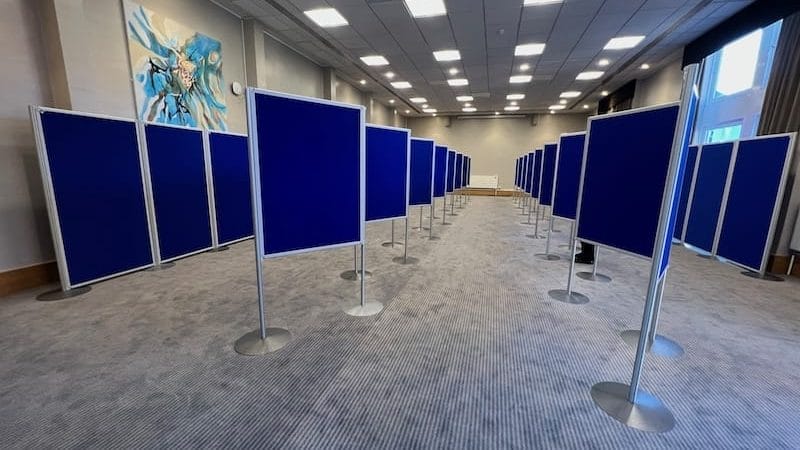
Understanding Poster Board Sizes
Pegasus Sound and Light offers two standard display board sizes for hire in Edinburgh:
- A0 Boards: 1200mm × 900mm
- XL Boards: 1800mm × 900mm
Both sizes can be positioned landscape or portrait, are double-sided, and can be used freestanding or linked into modular layouts. Posters are attached with Velcro dots only, ensuring no damage to boards or printed materials.
Tip: Consider your poster content. Text-heavy academic posters are usually better on A0 boards in portrait, while larger display graphics for trade exhibitions or planning consultations often work best on XL boards in landscape.
Step 1: Know Your Venue and Room Layout
Before calculating board numbers, check:
- Room dimensions (length × width)
- Ceiling height and lighting
- Entry and exit points
- Fire exits and walkways
Edinburgh venues commonly used for poster sessions and exhibitions include:
- University halls (e.g., University of Edinburgh lecture halls, business school atriums)
- Hotels and conference centres (e.g., The Sheraton Grand, The Glasshouse Hotel)
- Civic venues for public consultations (e.g., City Chambers, local council offices)
Knowing the room dimensions allows you to plan aisles, maintain safe circulation, and decide between single or double-sided display arrangements.

Step 2: Decide on Layout Type
The layout type has a major impact on how many boards you’ll need. Common layouts include:
- Single row against walls – Boards are positioned along the perimeter. Suitable for smaller events or narrow spaces.
- Double row in the centre of the room – Boards are back-to-back, creating aisles on either side. Optimises floor space for larger events.
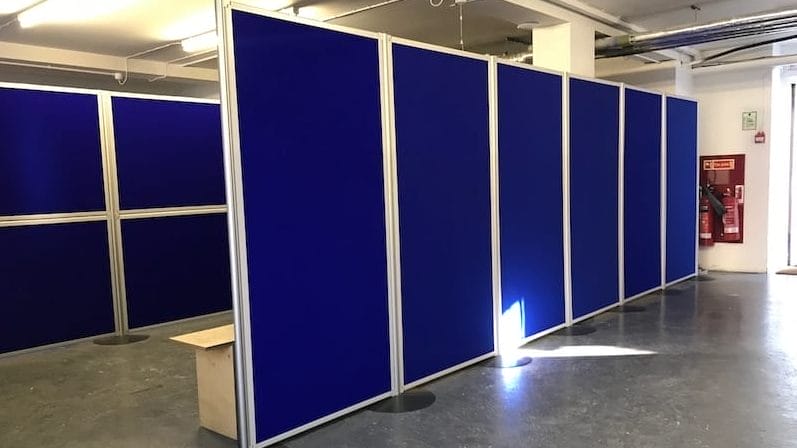
- Linked modular runs – Boards connected end-to-end, often used for exhibitions or public consultations where continuity is visually important.
- Zig-zag or angled layouts – Creates natural walkways and can highlight focal points. Useful for galleries or public engagement events.
Tip: Double-sided boards effectively double your display capacity but require wider aisles to allow smooth visitor flow.
Step 3: Calculate How Many Boards You Need
To estimate board numbers:
- Measure wall space or floor area available.
- Consider aisle width: minimum 1.2–1.5m for visitor circulation.
- Factor in double-sided boards if using central rows.
Example calculations for Edinburgh venues:
| Event Type | Room Size | Board Type | Layout | Number of Boards |
|---|---|---|---|---|
| Academic Conference | 20m × 10m hall | A0 | Double row, back-to-back | 40 boards |
| Trade Exhibition | 25m × 15m hall | XL | Linked modular runs | 30 boards |
| Public Consultation | 15m × 12m civic hall | XL | Wall perimeter + central zig-zag | 20–25 boards |
Tip: Always leave some extra boards to accommodate late additions or unexpected layout changes.
Step 4: Consider Visitor Flow and Accessibility
Visitor comfort is critical. Plan aisles so attendees can:
- Walk without congestion
- Stop at each poster without blocking traffic
- Easily access fire exits
For double-sided central rows:
- Maintain 1.5–2m between rows for comfortable movement
- Ensure 1.2m minimum aisle width on either side of walls
Tip: Use signs or numbered boards to help visitors navigate large sessions, particularly for university conferences or planning consultations.
Step 5: Factor in Event Type and Poster Density
Different event types require different densities:
- Academic conferences: Often need more boards due to multiple parallel sessions. Allow 1 board per presenter, plus a few extra for keynote posters.
- Trade exhibitions: May use XL boards for larger graphics. Fewer boards are needed, but layout must allow smooth visitor circulation.
- Public consultations: Focus on visual clarity; space boards to allow small group discussions at each display.
Step 6: Flexibility with Freestanding or Linked Boards
Pegasus Sound and Light boards can be:
- Freestanding – Ideal for flexible layouts and temporary spaces
- Linked – Creates continuous panels for exhibitions or planning displays
Boards can be portrait or landscape, and are double-sided, giving you maximum display capacity without increasing the footprint.
Step 7: Professional Setup
For all Edinburgh events:
- Boards can be delivered, installed, and collected by professionals
- Safe positioning and alignment are guaranteed
- Event organisers can focus on content rather than logistics
For more details, see our guide on:
Display Board Delivery & Setup Edinburgh
Summary
To decide how many poster boards you need:
- Know your room dimensions and venue constraints
- Choose the appropriate layout type (single row, double row, linked, zig-zag)
- Calculate required boards factoring in double-sided usage
- Ensure aisles and circulation meet safety and comfort standards
- Adjust density according to event type (academic, exhibition, consultation)
- Use freestanding or linked boards for flexibility
- Leverage professional setup for efficiency and peace of mind
By following these steps, you can ensure a professional, well-organised poster session or exhibition at your Edinburgh venue.